How to Pay E-Challan Online in Pakistan 2026
How to Pay E-Challan Online is one of the most searched questions in Pakistan and for good reason. Almost every driver has faced that moment when an unexpected SMS arrives or you suddenly discover a challan while checking your vehicle number online. The real frustration starts when you’re unsure how to pay it, which method is correct, or whether the payment will even update in the PSCA system.
If you’ve ever stood in long queues at traffic police offices, dealt with unclear instructions, or worried about paying the wrong PSID, you’re definitely not alone. Thousands of drivers across Lahore, Faisalabad, Rawalpindi, Multan, Gujranwala, and other cities face the same confusion every day. And with different apps, portals, and payment options available, it’s easy to feel overwhelmed.
But the good news? Paying your E-Challan Punjab doesn’t have to be stressful anymore.
Thanks to the Punjab Safe Cities Authority and the Government of Punjab, the entire process is now digital. Whether you prefer ePay Punjab, JazzCash, Easypaisa, NayaPay, or your banking app, you can clear your challan within minutes without visiting any office or filling out any paperwork.
This complete step-by-step guide simplifies everything for you. No jargon, no confusion just clear, accurate instructions on every online method so you can pay your E-Challan quickly, safely, and confidently.
Why Paying E-Challan Online Is the Best Option
Paying your challan online is faster, safer, and more transparent. Benefits include:
- No need to visit traffic police offices
- Zero waiting in queues
- Immediate digital receipts
- Secure payments via banking partners
- Ability to pay anytime (24/7)
- Works for all Punjab Safe City challans
- Eliminates chances of “manual errors”
Now let’s get into the complete, practical, step-by-step payment methods.
Important Tips Before Paying Your E-Challan Punjab
Before making any E-Challan payment through JazzCash, Easypaisa, NayaPay, or your banking app, take a few essential precautions to avoid issues like failed payments, double deductions, or payment disputes.
Start by verifying your PSID and vehicle details. Confirm that the vehicle registration number, violation type, location, timestamp, and total fine amount match exactly. Even a single incorrect digit in the PSID can direct your payment to the wrong challan, which becomes difficult to reverse later.
After completing the payment, save your digital receipt immediately. Whether the app provides a PDF, a downloadable receipt, or only an on-screen confirmation, take a screenshot and store it safely. This record is extremely useful if the PSCA system takes time to update or if you ever need to prove that the payment was successfully made.
If you think the challan is incorrect, don’t ignore it. The official PSCA E-Challan Portal shows camera images or video clips as evidence for each violation. Review the footage carefully. If the violation seems inaccurate or results from a system error, raise a dispute with the relevant authority without delay. Timely action prevents the issue from escalating.
Also ensure that your vehicle documents are updated, including driving license, vehicle registration, and fitness certificates. Expired or missing documents often result in repeated challans and unnecessary penalties.
It’s also a good habit to check your e-challan status regularly. Many challans are issued without SMS alerts, especially in major cities like Lahore, Rawalpindi, Faisalabad, and Multan. Checking every few weeks helps you avoid late payments and prevents fines from piling up.
Finally, avoid these common mistakes that many drivers unintentionally make:
- Entering incomplete or incorrect vehicle numbers
- Entering the wrong PSID
- Trying to pay using an expired PSID
- Confusing PSCA traffic challans with Motorway (M-Tag) challans
- Generating multiple PSIDs for the same challan
By staying alert and avoiding these errors, you can ensure a smooth, error-free, and stress-free E-Challan payment experience.
1. Pay Traffic E-Challan Online Using ePay Punjab (Step-by-Step Guide)
ePay Punjab is the official digital payment platform of the Government of Punjab. It is the most authentic, safest, and widely used method to pay traffic E-Challans in Lahore, Islamabad, Rawalpindi, Multan, Faisalabad, Gujranwala, Sargodha, Bahawalpur, and all PSCA-covered cities.
You can use ePay Punjab on both:
- Mobile App (Android + iOS)
- Web Browser (Desktop + Mobile)
Step 1: Open ePay Punjab (App or Website)
- Download the ePay Punjab app from Google Play Store or Apple App Store
OR - Visit the official ePay Punjab website on your desktop browser
Once opened, sign in using your mobile number or simply continue without logging in.
Step 2: Open the “Department” Section
Inside the app:
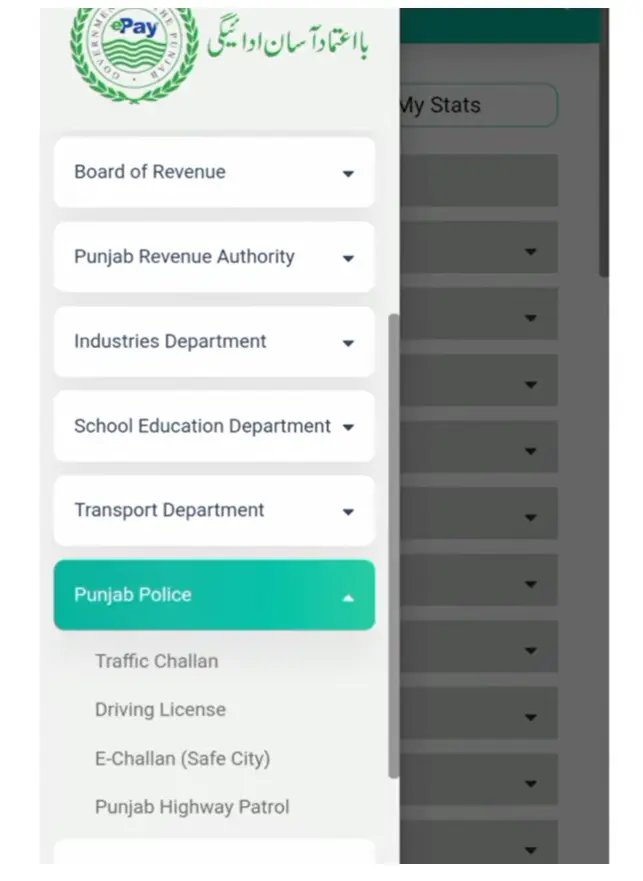
- Tap “Department”
- Select “Punjab Police”
This will open all Punjab Police-related services including Safe City E-Challan.
Step 3: Choose “E-Challan (Safe City)”
Now click on:
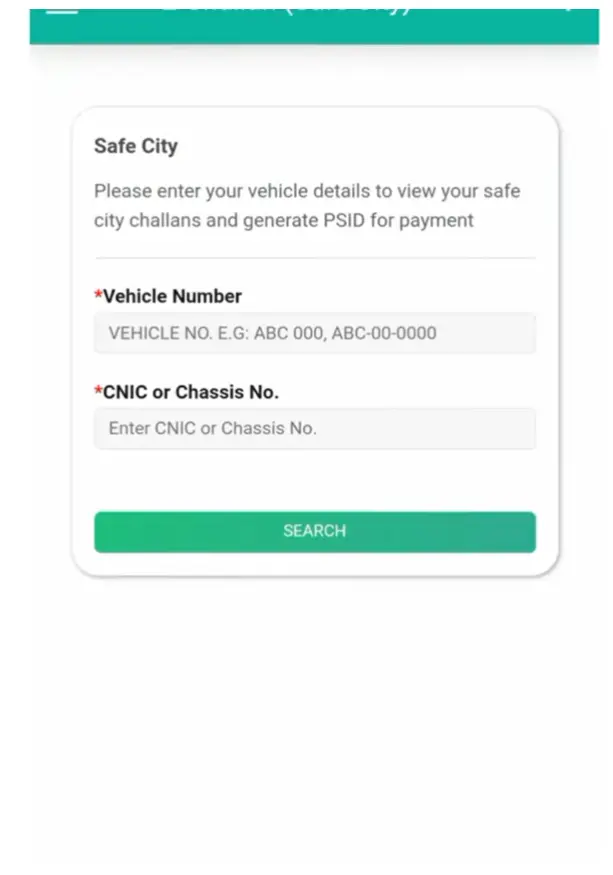
E-Challan (Safe City)
This takes you to the online challan inquiry portal.
Step 4: Enter Your Vehicle Details
You can search for your E-Challan using either:
- Vehicle Number (e.g., LEA-1234, ABC-22-567)
- Chassis Number (if the plate number does not show challan)
After entering the number, tap “Search”.
ePay Punjab instantly fetches all challans linked to your vehicle.
Step 5: Review Your E-Challan Details
You will now see a complete list of pending challans with all important information:
- Challan Number
- Owner Name
- Vehicle Make & Model
- Vehicle Color
- Date & Time of Violation
- Location of Violation
- Type of Violation
- Fine Amount
- Due Date
- Current Payment Status
This transparent breakdown helps you verify your violation before paying.
Step 6: Select Your Challan(s) for Payment
You can:
- Pay one challan
- Pay multiple challans together
- Clear all challans at once
This flexibility is extremely convenient for commercial vehicles and frequent drivers.
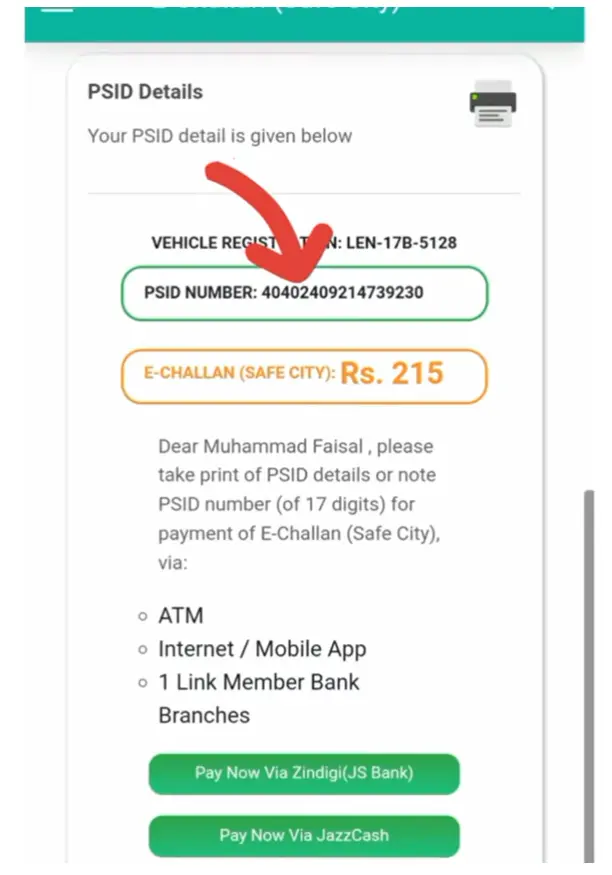
Step 7: Generate Your PSID (Payment Slip ID)
Click “Generate Challan”
You will receive a 17-digit PSID.
This PSID is required to make the payment through any banking app or wallet.
2. Pay PSCA E-Challan Using Banking Apps (All Banks Supported)
Once you have your PSID, you can pay using any banking app in Pakistan, including:
- HBL
- UBL
- Meezan Bank
- Bank Alfalah
- Faysal Bank
- Bank Islami
- Allied Bank
- Bank of Punjab
- Askari Bank
- JS Bank
- Dubai Islamic Bank
- And all other digital banks like SadaPay & NayaPay
3. How to Pay E-Challan Using Any Bank App (Universal Method)
Almost every major bank in Pakistan now supports PSID-based e-challan payments. Even if your banking app doesn’t show “Traffic Challan” directly, you can still pay using the universal PSID method.
Step 1: Open Your Banking App
Log in using your username, password, or biometric authentication.
Step 2: Go to “Bill Payments” or “Government Payments”
Different banks use different names. Look for any of these:
- Bill Payments
- Government Fees
- Taxes / Levies
- Punjab Police / Safe City
If your app has a search bar inside Bill Payments, simply search for “Punjab Police” or “PSCA.”
Step 3: Select “Punjab Police – E-Challan / PSCA”
This option is used for all Punjab E-Challan payments generated through ANPR, traffic police, and Safe Cities Authority.
Step 4: Enter Your 17-Digit PSID
Enter the PSID exactly as mentioned on the challan.
Even one incorrect digit will cause a failed transaction.
Step 5: Review the Details
Your bank app will fetch the official challan data. You will see:
- Challan reference
- Total fine amount
- Vehicle registration details
- Violation type
Always double-check before paying.
Step 6: Tap “Confirm” to Pay
Complete the payment by verifying with PIN or biometric approval.
Step 7: Save the Digital Receipt
Every banking app generates an instant receipt.
Always take a screenshot—this serves as your legal proof until the PSCA portal updates.
4. How to Pay E-Challan Online Using JazzCash
Paying your Punjab E-Challan through JazzCash is one of the fastest and most reliable methods because the app directly supports PSID-based government payments. Just make sure your challan has a valid Payment Slip ID (PSID) before starting.
Steps to Pay E-Challan via JazzCash
- Open your JazzCash mobile app and log into your account.
- From the home screen, tap “Government Payments.”
- Select Traffic Challan (or the relevant option based on your province).
- Carefully enter your PSID number exactly as shown on your challan.
- The system will automatically fetch challan details — verify the amount, vehicle number, and violation.
- Tap Pay, and authenticate using your PIN/fingerprint.
- JazzCash will instantly generate a digital receipt, and your payment will also reflect on the PSCA system shortly.
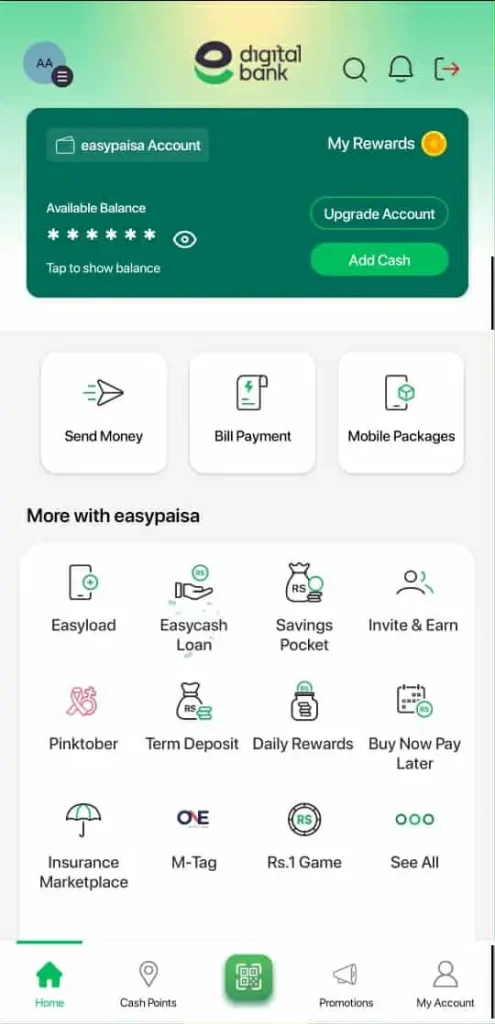
5. How to Pay E-Challan Online Using EasyPaisa
Easypaisa is another widely used method for paying Punjab E-Challan bills. The process is PSID-based and works for all Punjab Safe Cities Authority challans.
Steps to Pay E-Challan via Easypaisa
- Open the Easypaisa app on your phone.
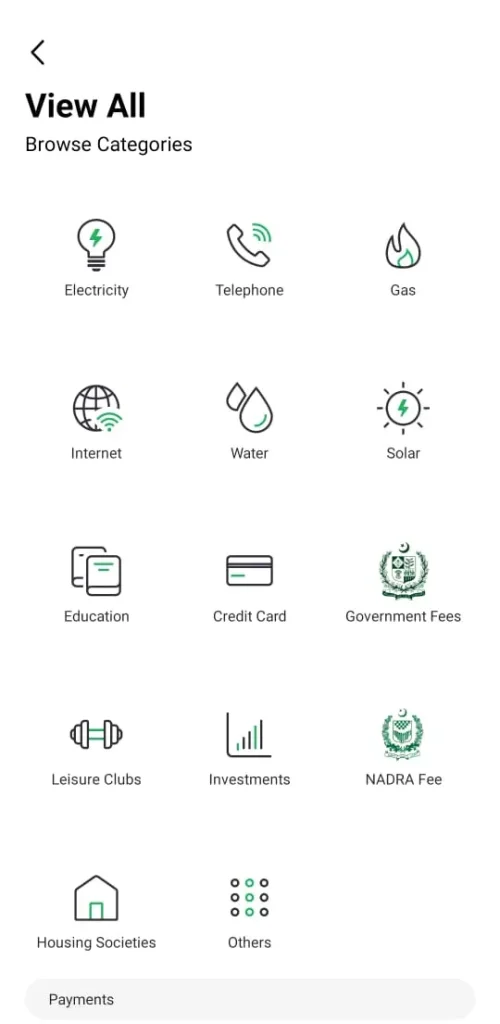
- Scroll down and tap “See All” to view full services.
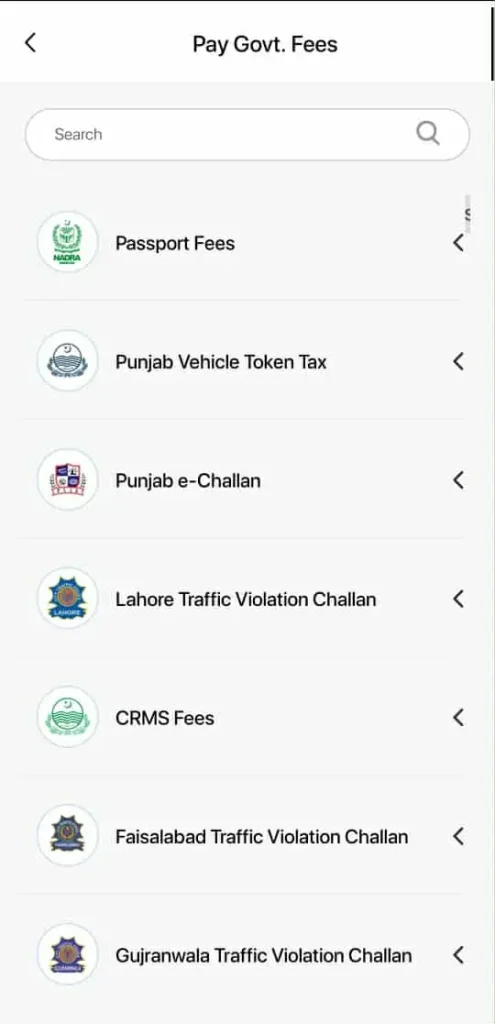
- Under the list, locate and tap Government Fees.
- Select Traffic Challan / Punjab E-Challan from the available options.
- Enter your PSID and continue.
- Review the fetched challan details for accuracy.
- Tap Confirm & Pay to complete the transaction.
- Easypaisa will send a payment confirmation message, and you can also download a receipt.
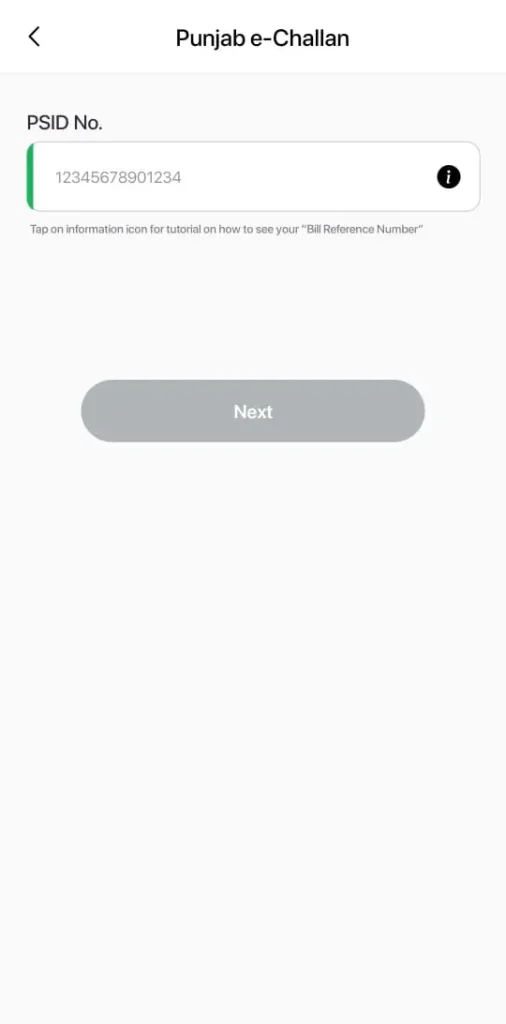
6. How to Pay E-Challan Online Using NayaPay
NayaPay has grown extremely fast in Pakistan because of its simple interface and reliable government bill payment system. It fully supports PSID-based e-challan payments for Punjab.
Steps to Pay E-Challan via NayaPay
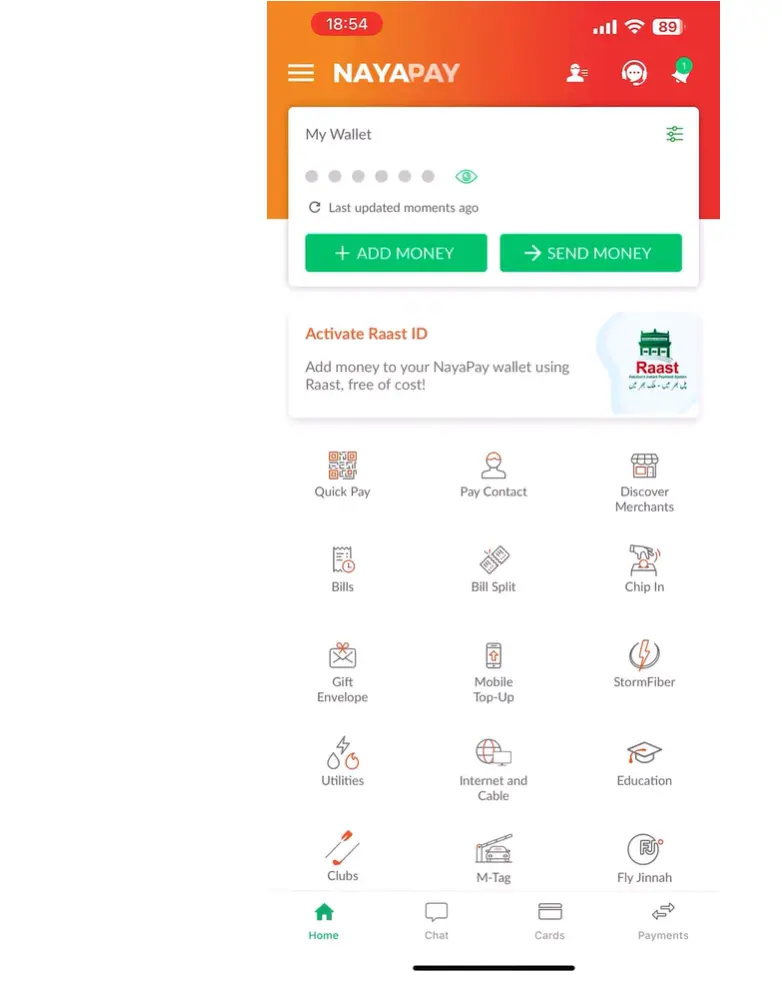
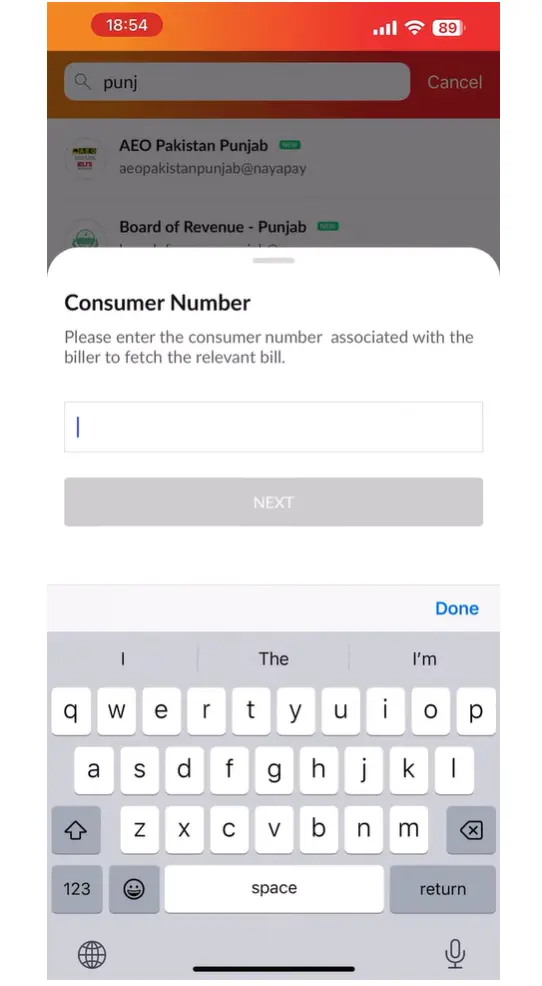
- Open the NayaPay app and log in.
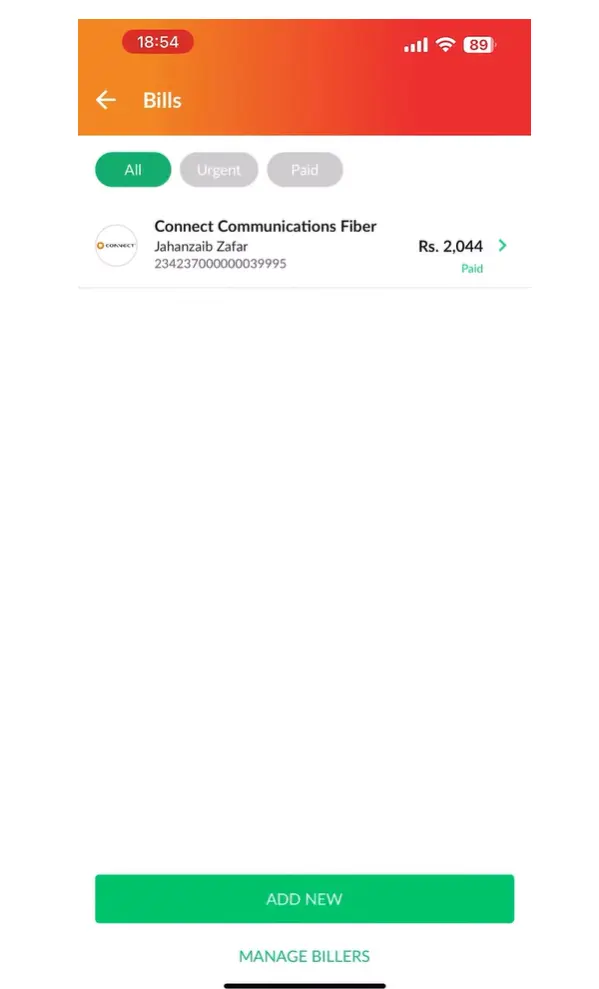
- Go to the Bills section on your dashboard.
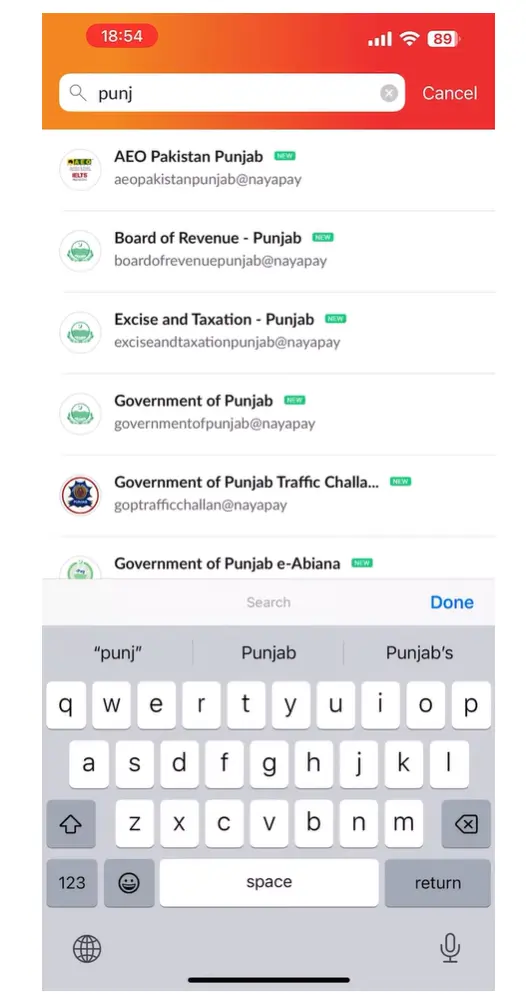
- Tap “Add New Bill.”
- From the list, search and select Government Services.
- Enter your PSID (Payment Slip ID).
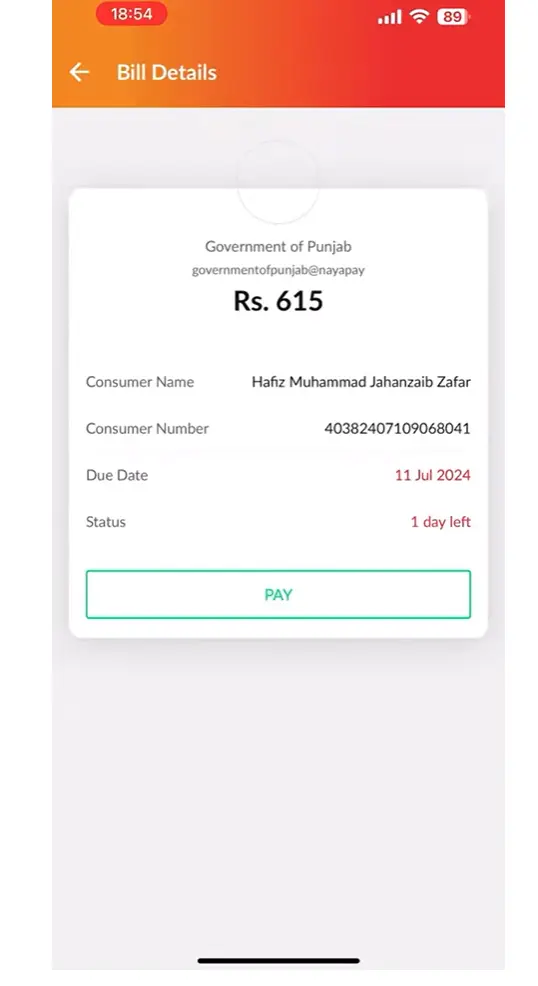
- The app will retrieve all challan details in real time, verify the vehicle info, violation, and total amount.
- Tap Confirm & Pay to complete your payment.
After successful payment, you will receive:
- A digital receipt inside the NayaPay app
- A push notification for confirmation
- Automatic PSCA system update, usually within minutes
7. How to Pay E-Challan Using SadaPay
SadaPay also fully supports traffic challan payments via PSID. The interface is simple, clean, and quick to navigate.
Steps to Pay E-Challan via SadaPay
- Open the SadaPay app on your phone.
- From the home screen, tap “Bill Payments.”
- Use the search bar and look for “Punjab Police / E-Challan.”
- Enter your 17-digit PSID.
- Review details fetched from the PSCA system.
- Tap Pay, and save the digital receipt for your record.
Payment updates usually reflect within a few minutes on the e-challan portal.
8. How to Pay E-Challan Through an ATM Machine
If you prefer to pay in person or your mobile app is not working, you can pay your challan at an ATM.
Multiple banks support this method, such as:
- HBL
- UBL
- Meezan Bank
- Bank Alfalah
- Bank of Punjab (BOP)
Steps to Pay E-Challan at ATM
- Insert your ATM card and enter your PIN.
- Go to Bill Payment or Payments Menu.
- Select Punjab Police / Traffic Challan.
- Enter your PSID.
- Verify the challan details fetched from the system.
- Proceed to Confirm Payment.
- Collect the printed receipt, keep it safe as proof.
ATMs are a reliable backup when mobile apps or internet banking are not accessible.
9. How to Pay E-Challan Over-the-Counter (Bank Branch Payment)
If you prefer physical banking or want a manually stamped receipt, you can pay your e-challan at any branch of the following banks:
- Bank of Punjab (BOP)
- UBL
- HBL
- Meezan Bank
- ABL
Steps to Pay E-Challan at a Bank Branch
- Visit any nearby branch from the list above.
- Inform the cashier:
“I want to pay a PSCA E-Challan / Traffic Challan.” - Provide the cashier with your 17-digit PSID.
- Make the payment in cash or via bank account (depending on bank policy).
- Receive your stamped, official receipt.
This method is especially useful for people who prefer manual confirmation or need a hard copy for documentation.
How to Confirm Whether Your E-Challan Has Been Successfully Paid
Once you’ve completed the payment, it’s important to verify that the challan has actually been marked as paid in the system. This helps you avoid future disputes or accidental double payments. You can confirm the payment using any of the following methods:
Using the ePay Punjab App or Website:
Re-enter your PSID in the ePay Punjab platform. If the transaction has been processed, the status will clearly display “Paid.” This is often the fastest way to confirm because the system updates almost instantly.
Through the PSCA E-Challan Portal:
Visit the official PSCA portal and search using your vehicle number. If the payment has been received, the challan will show a green “Paid” label next to it. This method also allows you to re-check the violation details for peace of mind.Checking Your Banking App Payment History:
Every banking app stores a record of your past transactions. Open your “Payment History,” “Bill Payments,” or “Government Fees” section to see whether the PSID has been recorded as paid. This is helpful if the portal is slow to update.
Paying your E-Challan online has never been easier, whether you use JazzCash, Easypaisa, NayaPay, ePay Punjab, or your banking app. With secure digital payments and instant verification, you can settle your challan in minutes without visiting any office. Stay updated, pay on time, and keep your driving record clear with hassle-free online E-Challan payments.